One Workspace for
Every Server.
Stop juggling PuTTY, FileZilla, VS Code, and scattered password notes. Moorix combines an SSH terminal, dual-pane SFTP, a built-in editor, an encrypted vault, port forwarding, and cloud sync into one fast desktop app.
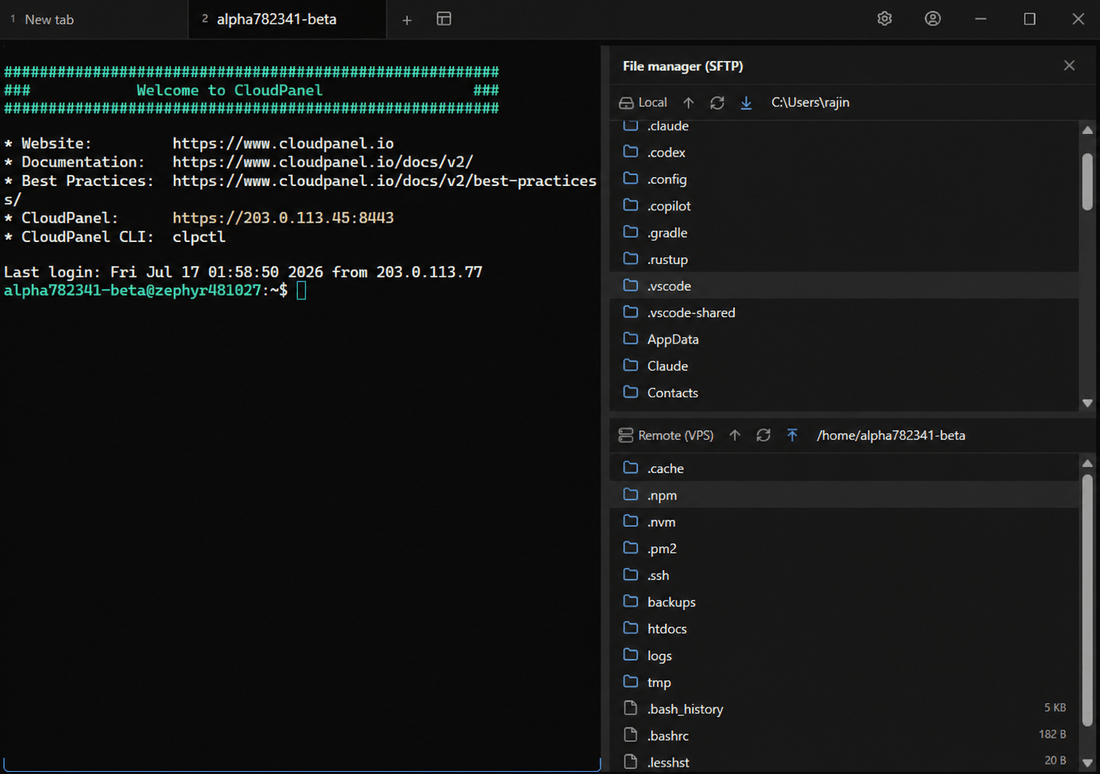
A complete server toolkit, in one place
Built for developers, DevOps engineers, and sysadmins who are tired of context-switching between half a dozen tools.
SSH Terminal
Password & private-key auth with host-key verification (TOFU). Multi-tab, split panes, auto-reconnect — plus Telnet & Serial transports.
Dual-Pane SFTP
FileZilla-style local ↔ remote panes. Drag & drop from your OS, recursive transfers with progress, compress/extract, rename, SHA-256.
Built-in Code Editor
Edit and save remote files in place with the Monaco (VS Code) engine. Multi-file tabs, split view, syntax highlighting. No download-edit-reupload.
Encrypted Vault
AES-GCM credential vault protected by a master password, with OS keychain integration. Passwords & keys never stored in plaintext config.
Port Forwarding
Local (-L) and Dynamic / SOCKS5 (-D) tunnels. Reach internal services and route traffic securely straight from the workspace.
Cloud Sync
Cross-device sync via Google Drive — end-to-end encrypted and auto-syncing in the background. Your connections follow you everywhere.
17+ Themes
Nord, Gruvbox, Catppuccin and more, plus custom keybindings. Make the workspace feel like yours.
Fast & Lightweight
Built on Rust + Tauri 2 with a native PTY. Silent auto-update keeps you on the latest version, always.
Edit remote files like they're local
The built-in Monaco editor opens files straight off your server with full syntax highlighting, multi-file tabs, and split view. Save in place — no more download, edit, re-upload loops.
- Terminal and file manager, side by side
- Drag & drop uploads from your OS
- Right-click: zip, extract, checksum, open in terminal
- Host-key verification keeps sessions trusted
alpha782341-beta@zephyr481027:~$ ssh deploy@moorix
Welcome to Moorix workspace
deploy@moorix:~$ tail -f /var/log/app.log
[info] server listening :8443
[ok] cloud sync complete
deploy@moorix:~$
One app that replaces four
| Feature | Moorix | PuTTY | FileZilla | VS Code |
|---|---|---|---|---|
| SSH Terminal | ||||
| Dual-pane SFTP | ||||
| Built-in Editor | ||||
| Credential Vault | ||||
| Port Forwarding | ||||
| Everything in one app |
Windows
.exe installer
macOS
.dmg universal
Linux
.AppImage / .deb
Docs, releases & source
Everything you need to learn Moorix, track what's new, and follow development.

Your server will never
feel far away again
Grab the installer, set up in seconds, and manage every VPS, dedicated server, and cloud instance from a single window.
Windows · macOS · Linux — no account required